Managing employee attendance accurately is essential for running an efficient business. When you rely on manual registers, paper timesheets, or outdated punch cards, tracking working hours can become time-consuming and difficult to manage. Missed entries, buddy punching, calculation errors, and delayed reports may affect payroll accuracy and workforce productivity. A biometric attendance system provides a more reliable way to record employee attendance while helping you streamline daily business operations.
Whether you manage a small office, a retail outlet, a warehouse, or a large corporate facility, biometric technology can help you monitor attendance, improve accountability, and make informed staffing decisions. In Dubai, where businesses operate across different industries and work schedules, an appropriately configured attendance solution can support better workforce management.
What Is a Biometric Attendance System?
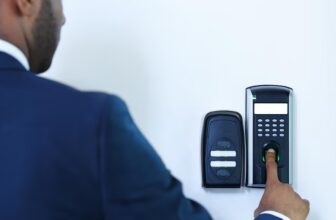
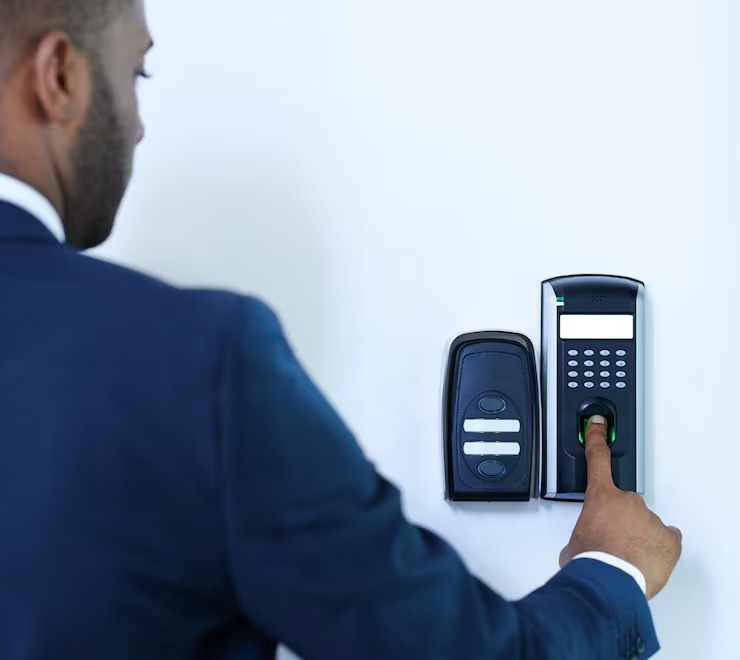
A biometric attendance system uses unique physical or behavioural characteristics to verify an employee’s identity and record attendance. Depending on the device, this may involve fingerprint recognition, facial recognition, or another supported biometric method.
When an employee arrives at work or leaves the premises, the system verifies their identity and records the relevant timestamp. Depending on the software, you can use these records to calculate working hours, identify late arrivals, monitor overtime, and generate attendance reports.
Unlike traditional attendance registers, biometric systems link attendance records to individual employees. This reduces opportunities for colleagues to clock in for one another and gives your HR team a more consistent source of attendance information.
Why Your Business Needs a Biometric Attendance System
An effective attendance management process helps you understand how your workforce operates. A biometric solution can improve this process by reducing repetitive administrative work and providing more dependable records.
1. Improve Attendance Accuracy
Manual attendance records can contain incorrect entries, missing signatures, or inconsistent time calculations. Biometric verification helps reduce these problems by recording attendance against a verified employee identity.
You can use the resulting records to review punctuality, identify recurring attendance issues, and maintain more accurate working-hour calculations. For the best results, establish clear attendance policies and make sure employees understand how the system records their time.
2. Reduce Buddy Punching
Buddy punching occurs when one employee records attendance on behalf of another. Traditional punch cards and shared sign-in sheets make this difficult to prevent.
Biometric authentication helps reduce this risk because employees must use their own enrolled biometric credentials. Although no system eliminates every form of misuse, biometric verification strengthens attendance accountability and supports fairer workforce management.
3. Simplify Payroll Processing
Payroll teams need reliable information about attendance, approved leave, overtime, and working hours. Collecting these details manually can lead to delays and calculation errors.
A biometric attendance system can generate reports that help you review working hours and prepare payroll data. When the system integrates with compatible HR or payroll software, you can reduce duplicate data entry and simplify routine calculations.
Before implementation, confirm that the solution supports your payroll workflow, overtime rules, shift patterns, and required reporting formats.
4. Strengthen Employee Accountability
Clear attendance records help you apply workplace policies consistently. You can identify repeated late arrivals, unexpected absences, and attendance patterns that may require further review.
Use these insights constructively. Instead of relying only on disciplinary action, investigate whether recurring problems relate to scheduling, transportation, workload, or unclear policies. A transparent process helps you maintain accountability while supporting a productive working environment.
5. Save Administrative Time
HR teams often spend significant time checking registers, correcting timesheets, preparing monthly summaries, and responding to attendance queries.
Automated attendance reporting reduces much of this repetitive work. Your team can spend more time on employee support, workforce planning, and other important responsibilities.
Choose a system that generates useful reports quickly and allows authorised staff to retrieve information without unnecessary manual processing.
Types of Biometric Attendance Systems
The right technology depends on your workplace, employee numbers, security requirements, and operating conditions.
Fingerprint Attendance Systems
Fingerprint readers identify employees using fingerprint characteristics. They are commonly used in offices, shops, staff entrances, and other workplaces that need straightforward attendance recording.
When selecting a fingerprint device, consider recognition speed, expected daily usage, hygiene requirements, and performance for employees whose fingerprints may be difficult to read.
Facial Recognition Attendance Systems
Facial recognition devices verify employees using facial characteristics. Depending on the model, employees may be able to record attendance without touching a shared reader.
These systems can be useful in busy workplaces where contactless verification is desirable. However, you should assess lighting conditions, camera placement, privacy requirements, and the device’s ability to handle legitimate variations in appearance.
Multi-Modal Biometric Systems
Some systems support more than one biometric method, such as fingerprints and facial recognition. This can provide additional flexibility when a particular method does not work reliably for every employee.
You may also find devices that combine biometric verification with access cards, PINs, or other credentials. Evaluate whether these features meet your actual operational needs rather than paying for unnecessary functionality.
How Biometric Attendance Systems Improve Business Management
A biometric attendance system is more than a clock-in device. When connected to suitable management software, it can help you make better decisions about staffing and daily operations.
Better Shift and Workforce Planning
If you operate multiple shifts, you need to know whether the right number of employees is available at the right time. Attendance reports help you compare scheduled staffing with actual attendance and identify recurring coverage gaps.
For example, a warehouse manager can review shift attendance before assigning tasks, while a retail manager can identify periods when additional staff may be needed.
More Useful Attendance Reports
Reporting features can help you review late arrivals, absences, overtime, missed punches, and monthly attendance trends. These insights support more informed decisions about scheduling and workforce allocation.
However, attendance data should be interpreted in context. A missed punch may reflect a device problem rather than an employee’s absence, so provide a clear process for correcting legitimate errors.
Integration With Existing Business Systems
Your attendance system should fit into your current operational environment. Depending on your requirements, you may need integration with payroll applications, HR management platforms, access control devices, or employee scheduling software.
Before purchasing, check compatibility, integration costs, available technical support, and whether reports can be exported in the formats your business uses.
For workplaces that need both attendance tracking and controlled entry, explore Biometric Access Control Dubai solutions to assess how identity verification can support coordinated workforce management and facility security.
Choosing the Right Biometric Attendance System in Dubai
Dubai businesses have different operational requirements depending on their industry, premises, workforce size, and shift arrangements. Choosing a system that fits your actual working environment is more important than selecting a device based on price alone.
Consider the following factors before making your decision.
Assess Your Workforce Requirements
Estimate the number of employees who will use the system and identify the number of locations where attendance must be recorded. Consider whether you need separate devices for departments, branches, staff entrances, or remote facilities.
Also review shift rotations, overnight schedules, overtime policies, and attendance approval procedures.
Evaluate Device Performance
A device should be suitable for your workplace conditions and expected transaction volume. Compare recognition speed, reliability, storage capacity, connectivity, and the availability of replacement components.
For facial recognition, assess lighting and camera placement. For fingerprint readers, consider hygiene and the needs of employees whose fingerprints may not scan consistently.
Review Software and Reporting Features
Check whether the software provides daily attendance summaries, monthly reports, overtime calculations, leave-related workflows, and configurable permissions.
If you operate multiple branches in Dubai or elsewhere in the UAE, centralised reporting may help your authorised managers review attendance across locations.
Prioritise Privacy and Data Protection
Biometric information requires careful handling because it is linked to an individual’s identity. Before deployment, establish a clear purpose for collecting biometric data, restrict access to authorised personnel, and confirm how the provider stores, protects, retains, and deletes records.
Review applicable UAE data protection requirements and any relevant exceptions or sector-specific rules with a qualified professional. Where required, provide appropriate notices, establish a lawful basis for processing, and consider an alternative attendance method for employees who cannot or should not use a particular biometric option.
Ask vendors about encryption, access logs, backup procedures, software updates, and the protection of biometric templates. Avoid collecting more information than your business genuinely needs.
Consider Installation and Ongoing Support
Successful implementation requires more than purchasing hardware. You may need device installation, employee enrolment, software configuration, network connectivity, testing, and staff training.
Choose a provider that can explain the installation process, expected timelines, warranty terms, maintenance options, and troubleshooting procedures. Reliable technical support helps reduce disruptions when attendance devices or integrations stop working.
Common Mistakes to Avoid
Even a capable attendance system can deliver disappointing results if you implement it without proper planning.
- Choosing based only on price: A low-cost device may lack essential reporting, integration, or support features.
- Ignoring employee training: Employees need to understand enrolment, clock-in procedures, missed-punch corrections, and attendance policies.
- Overlooking network reliability: Confirm how the device handles connectivity interruptions and whether attendance records can be synchronised safely.
- Using unclear policies: Explain how breaks, overtime, shift changes, late arrivals, and corrections are handled.
- Neglecting maintenance: Keep devices clean according to manufacturer guidance, install supported updates, and test backup procedures.
- Ignoring privacy responsibilities: Limit access to biometric information and establish appropriate retention and deletion practices.
Addressing these issues early can help you achieve a smoother rollout and better long-term results.
Why Work With Netcom System Solutions LLC?
Selecting an attendance solution involves understanding your business processes, infrastructure, and security requirements. A suitable technology partner can help you assess these needs and identify an installation approach that supports your daily operations.
Netcom System Solutions LLC provides technology and security-related services for business environments. When evaluating a provider, ask how the proposed solution will integrate with your existing network, access control infrastructure, and workforce management software. Confirm the exact products, installation scope, support arrangements, and compliance considerations before proceeding.
If you are comparing attendance and identity verification options, review the services offered by Netcom System Solution LLC and determine which solutions match your organisation’s requirements. Ask for a demonstration where possible so your team can evaluate usability, reporting, and device performance before making a decision.
For a tailored assessment of your premises, workforce size, and integration needs, visit the Contact Us page on the company’s website to enquire about suitable solutions, installation requirements, and technical support.
Steps to Implement a Biometric Attendance System Successfully
Follow a structured process to get more value from your investment.
- Define your objectives: Identify whether your priority is attendance accuracy, payroll preparation, shift monitoring, access coordination, or all four.
- Assess your workplace: Review entrances, network availability, employee traffic, and the number of devices required.
- Compare suitable solutions: Evaluate biometric methods, reporting functions, integrations, support, and total ownership costs.
- Set attendance policies: Document clock-in procedures, break rules, overtime approvals, and the correction process for missed entries.
- Configure permissions: Give employees and managers access only to the information they need.
- Run a pilot: Test the system with a representative group before rolling it out across your organisation.
- Train employees: Explain how to use the devices and where to report technical problems.
- Review performance: Monitor attendance accuracy, processing time, employee feedback, and system reliability after launch.
This practical approach helps you identify potential problems early and adapt the system to your business needs.
Conclusion
Biometric attendance systems can help you improve attendance accuracy, reduce buddy punching, simplify payroll preparation, and strengthen workforce management. By combining reliable verification with useful reporting and clear workplace policies, you can make attendance tracking more consistent and less labour-intensive.
For businesses in Dubai, the best solution is one that fits your workforce, integrates with existing systems, protects employee information, and includes dependable technical support. Assess your operational requirements carefully, compare available technologies, and plan implementation before committing to a system. With the right approach, biometric attendance can become a valuable part of your broader business management strategy.
Frequently Asked Questions
1. What is a biometric attendance system?
A biometric attendance system verifies an employee’s identity using characteristics such as fingerprints or facial features. It records clock-in and clock-out times, helping your business maintain attendance records, calculate working hours, and prepare reports.
2. How does biometric attendance improve payroll accuracy?
It provides timestamped attendance records that help you calculate working hours and review overtime or lateness. Integration with compatible payroll software can reduce manual entry and calculation errors, although approved leave and exceptions still require appropriate review.
3. Which biometric attendance system is best for a Dubai business?
The best option depends on your workforce size, workplace conditions, budget, software requirements, and privacy obligations. Compare fingerprint, facial recognition, and multi-modal devices before selecting a solution.
4. Can biometric attendance systems integrate with access control?
Yes. Compatible systems can combine attendance recording with access control infrastructure. Before implementation, confirm device compatibility, software integration, permissions, and whether attendance and entry records need to remain separate.
5. Is biometric attendance data secure?
Security depends on the device, software, configuration, and data-handling policies. Use appropriate access restrictions, encryption, retention controls, and security updates, and ensure biometric processing complies with applicable UAE requirements.